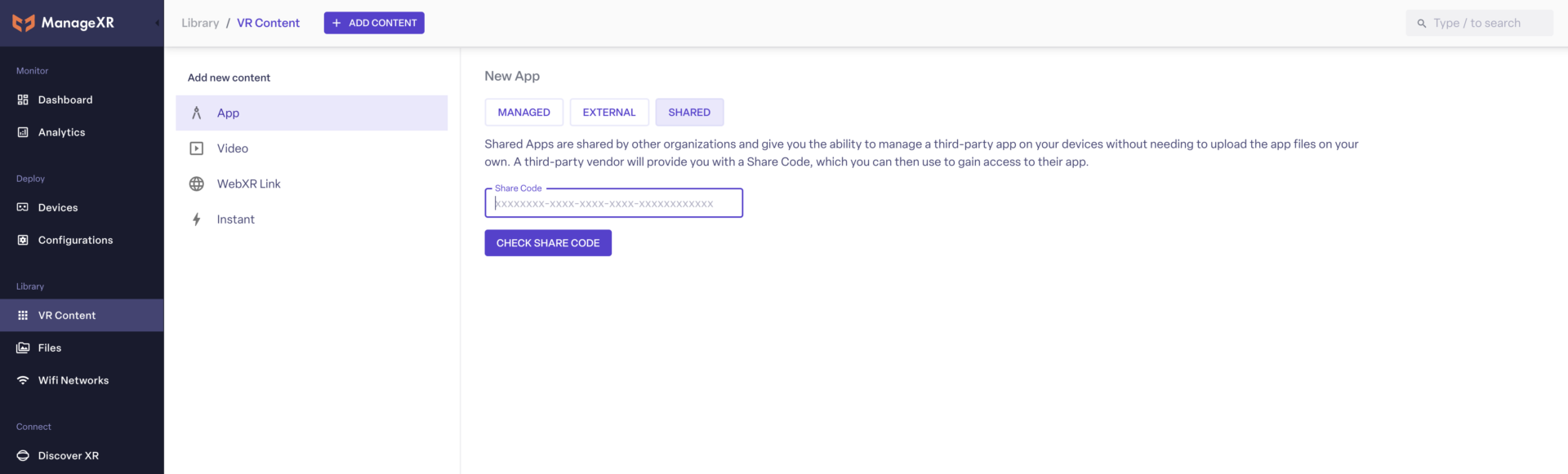
You will need to add Curio’s Share Code into your ManageXR account.
Go to your ManageXR account, select VR Content, then App, then choose Shared. You will be able to enter Curio’s Share Code which can be found below.
Enter Curio’s Code: 5adff647-020f-4b3e-aafb-793c7adcde23 to activate access on your device.
If you encounter any issues, feel free to contact us at mdm@CurioXR.org.
Curio Discount: For a 5% discount on ManageXR’s educational rate, email mdm@CurioXR.org.
The link below will open the 360° video tour on YouTube. For the best experience:
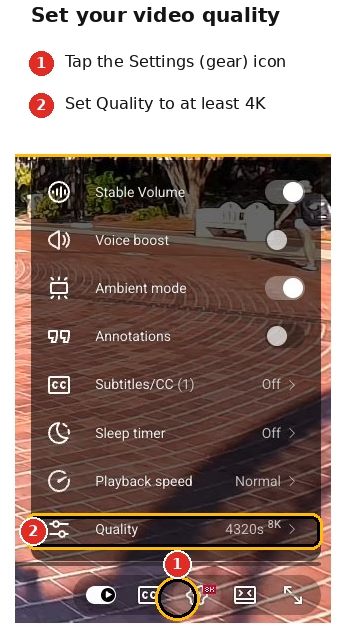
Increase the video quality in the YouTube video player settings as high as possible (see image on right).
Give the video a moment to load, especially at higher resolutions. Because 360° video files are huge, the video may look blurry at first if YouTube defaults to a lower resolution. If you have a slow internet connection, you may experience buffering when viewing in high quality.
Make sure to ‘look around’ the 360° video using your mouse, finger, or phone movement.